What Is the Window Peeper AI Video Effect?
 Window Peeper editorial team
Understand the window peeper video format: an outside-window camera, an ordinary indoor scene, a reaction and a closing curtain.
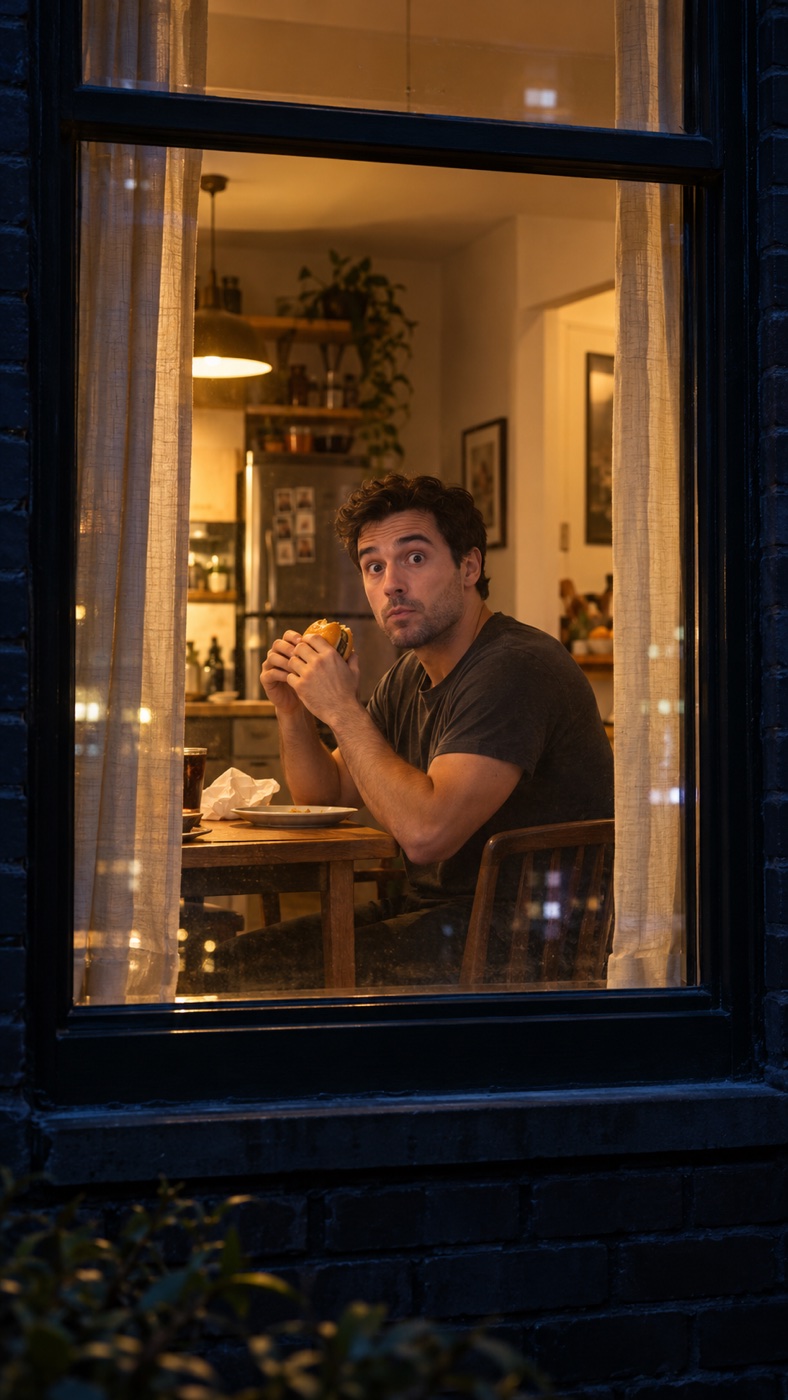
A window peeper AI video turns a portrait into a small, staged scene viewed through a window. The viewer begins outside. Someone inside is occupied with an ordinary activity, notices the camera, reacts and closes the curtain. The joke depends on that change in awareness: a quiet moment becomes an awkward encounter, then the curtain ends it.
Here, “window peeper” refers to a fictional AI video format. It is a creative effect for consenting subjects. It should not be presented as footage of a real person filmed through their actual window. Window Peeper at windowpeeper.pro is an independent generator for this format; sharing a descriptive phrase with another website does not establish an affiliation.
The five beats that make the scene readable
A useful version has five simple beats. First, establish the window and the person behind it. Second, show one recognizable activity, such as holding a burger. Third, let the person notice the viewer. Fourth, show a brief reaction. Fifth, draw the curtain across the opening.
Those beats give an AI model a clearer sequence than a long paragraph filled with competing events. They also give viewers a visual explanation without a caption. A person staring at the camera from the first frame loses the discovery moment. A curtain already covering the face makes the ending hard to distinguish from the beginning.
For a short clip, each action needs room. Keep the activity small and the reaction brief. Asking for cooking, dancing, eating, speaking and closing two curtains in the same shot makes it harder to preserve a coherent sequence. A single hand reaching for one curtain edge is a more manageable ending.
Why the camera position matters
The window is the boundary that organizes the scene. A camera that moves inside the room changes the story into an ordinary indoor portrait. A camera that drifts away from the building may make the subject too small to read. The most useful instruction is therefore a physical one: keep the camera outside the same window throughout the shot.
The window frame should stay visible at the edges. It tells the viewer where they are and makes the curtain movement understandable. Reflections can add atmosphere, but heavy reflections may hide the face. Start with gentle glass reflections and a stable camera before trying rain, elaborate lighting or a moving viewpoint.
Choosing a scene that fits one image
Food scenes work as practical examples because the object explains the activity quickly. A burger held near chest level reads differently from a bowl of noodles and chopsticks. Choose one. Combining several meals creates more objects and more opportunities for hands, utensils and food to change shape.
You can also use a book, a mug or a late-night desk scene. The important question is whether a stranger can identify the activity from one still frame. If the answer needs a paragraph of explanation, simplify it before spending a generation credit. Pick a scene that leaves one hand available to move the curtain.
What image-to-video can change
A reference photo guides a generation; it does not lock every detail. Facial features, clothing, hands, room objects and the window geometry may shift as the scene moves. The model also has to imagine areas that were not visible in the source image. A tight face crop gives it little information about shoulders, arms or the surrounding room.
Use a clear portrait of one adult who has agreed to appear in the result. Avoid uploading sensitive private photographs. Check the finished clip before posting, especially the moment when the hand reaches for the curtain. A technically completed clip can still have visual problems, and a new generation may produce a different interpretation.
Making the effect your own
Change the activity, lighting or reaction while keeping the basic geography stable. A warm kitchen and an embarrassed smile tell a different story from a dim study and a surprised glance. The best variation usually changes one major idea at a time. That makes it easier to understand which prompt change improved the result.
Do not add invented claims about who started the format, how many views it has or who appears in examples. Label a realistic result as AI-generated when sharing it, and follow the platform’s current disclosure rules. The scene works as a staged visual joke without suggesting that anyone was actually watched in private.
Where to start
Read the step-by-step window peeper tutorial for photo preparation and common problems. The window peeper prompt guide includes two original five-beat examples you can adapt. When your photo and scene are ready, open the generator and check the current one-time packs before buying.